
Land Rover Discovery: Climate settings
To view the CLIMATE SETTINGS menu, select Climate from the GENERAL SETTINGS menu.
- Auto Sensitivity: The air quality sensor, for Automatic recirculation, can be set to Low, Medium or High. Select Off to disable Automatic recirculation.
- Auto Power: The blower speed for automatic operation can be set to Low, Medium or High.
- Auto heated screens: The automatic operation of the front and/or the rear heated screens can be enabled/ disabled.
Note: Selection of the ECO driving mode may automatically alter some status and settings for these menus (dependent on previous selections).
AUTOMATIC RECIRCULATION
If an air quality sensor is fitted, the Climate control system will monitor exterior air pollution and select recirculation if it reaches a predetermined level. This feature only operates when selected from the CLIMATE SETTINGS menu.
Recirculation sensitivity can also be changed in the CLIMATE SETTINGS menu.
Pressing the recirculation button will not deactivate automatic recirculation.
AIR QUALITY SENSOR
The sensitivity of the air quality sensor can be adjusted using the Touch screen:
- To view the CLIMATE SETTINGS menu, select Climate from the GENERAL SETTINGS menu.
- Touch the buttons on the screen to
increase/decrease sensitivity.
To switch off Air quality sensing, touch Off.
AIR VENT OPERATION
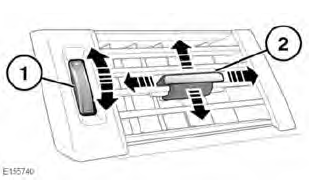
The vents can be opened using the following procedure:
- To open the vent, rotate the thumb wheel fully upwards, from the bottom (closed) position to the (top) open position.
- After the vent has been opened using the thumb wheel, the direction control can be used to adjust the direction of air flow.
Note: The vent can only be fully closed again using the thumbwheel. The vent can be closed, regardless of the position of the directional control.
Do not insert or attach items to the vents, for example, pens, air fresheners, etc.
Do not use excessive force while operating the vent control or the thumb wheel.


READ NEXT:
 Heated seats
Note: Heated seats consume a great
amount of battery power. They will only
operate when the engine is running.
If the Heated seat/s are operating when
the ECO program is selected, the Heated
seat/s w
Timed climate
The Timed climate system, when in
operation, provides a comfortable
temperature inside the cabin in advance
of using the vehicle, or maintains a
temperature when leaving the vehicle for
a short period
Timed climate remote controls
The Timed climate remote control has an
approximate range of 100 metres. There
is no need to point the antenna at the
vehicle.
ON button.
OFF button.
LED (operation indicator).
Antenna.
Note:
SEE MORE:
Diagnosis and Testing Navigation System / Symptom chart
SYMPTOM:
Black screen (navigation and audio
screens do not display)
POSSIBLE CAUSE:
Temperature in
passenger
compartment too low
Condensation in
passenger
compartment
Electrical harness
open/short circuit, disconnected
Component failure
ACTION:
GO to
Pinpoint Test
A.
SYMPTOM:
Diesel Fuel System Health and Safety Precautions
DESCRIPTION AND OPERATION
WARNINGS:
Fuel may not give adequate warning before toxic or harmful
effects
arise.
Exposure to fuel can be harmful and can cause severe health
damage or death.
Provide adequate ventilation when working on fuel systems.
Extreme care must be exercised when handlin
