
Land Rover Discovery: Controls overview
Land Rover Discovery (2009–2016) Owner's Manual / Controls overview
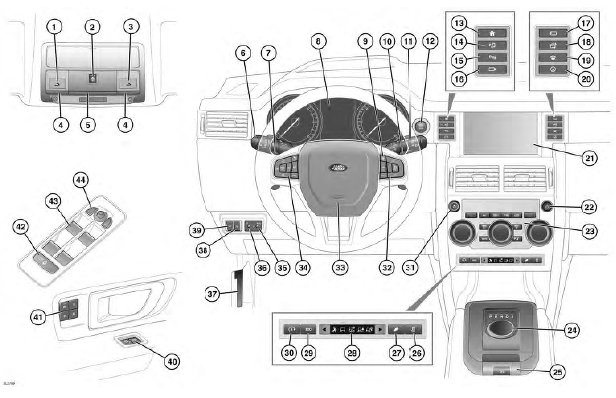
DRIVER CONTROLS
For further information on the numbered item, refer to the page number.
- InControl remote - Breakdown call
- Roof blind
- InControl remote - SOS emergency call
- Front map reading lamps
- Front interior lamp
- Exterior lamps and Trip computer
- Downshift gear paddle
- Instrument panel and Message centre
- Heated steering wheel
- Upshift gear paddle
- Wiper/washers controls
- Engine START/STOP
- Touch screen home menu
- Touch screen General settings or Park assist
- Mute or Parking aids off
- Touch screen on/off or Surround cameras
- Media source
- Media system
- Telephone
- Navigation
- Touch screen
- Hazard warning lamps.
- Heating, ventilation and air conditioning controls
- Rotary gear selector (123), for Manual transmission
- Electric Parking Brake (EPB)
- Dynamic Stability Control (DSC)
- Hill Descent Control (HDC)
- Terrain Response
- ECO Program
- Intelligent stop/start
- Media on/off and volume
- Cruise control or Adaptive Cruise Control (ACC)
- Horn.
- Audio controls, Voice control, and Telephone
- Headlamp levelling
- Interior illumination control
- Bonnet release
- Lane departure warning
- Tailgate release/open
- Central locking/unlocking
- Driving position memory
- Rear window isolation and child door locks
- Window controls
- Mirror adjustment/power-folding mirrors

READ NEXT:
 Rear head restraints
Adjust the head restraint so that
the top of the head restraint is
above the centre line of the head.
An incorrectly adjusted head
restraint increases the risk of death
or serious injury in the
Hidden storage compartment
There is a hidden storage compartment
underneath the front cup holder on the
centre console. To access the storage
compartment:
Press the button on the top of the front
cup holder.
Lift and remove
SEE MORE:
TAS Graphics
Colors used in the graphic are as follows:
Blue - Indicates the target item, item to be removed/installed or
disassembled/assembled
Green and Brown - Indicates a secondary item that needs to be detached,
removed/installed or disassembled/assembled prior to the target item
Yellow - Component th
Wiper operation
Do not operate the wipers on a dry
screen.
In freezing or hot conditions, make
sure the wipers have not stuck to
the glass. Use the winter park
position to lift the wiper blades
away from the screen.
Remove any snow, ice or frost from
the windscreen, around the wiper
arms and blades, and the
windscr
© 2019-2026 Copyright www.lrdisc.com
