
Land Rover Discovery: Automatic speed limiter (ASL)
ASL CONTROLS
ASL allows a speed limit to be set that the driver does not wish to exceed. When a speed has been set, the engine will respond normally up to the set speed.
Further accelerator pressure will not increase the speed beyond the set speed unless sudden, rapid acceleration (kickdown) is applied. If kickdown is initiated, ASL will be suspended. ASL will reactivate once the vehicle's speed drops below the set speed.
In certain conditions, such as a steep downhill gradient, the vehicle's speed may exceed the set speed limit. This is because engine braking is unable to maintain or reduce the vehicle's speed.
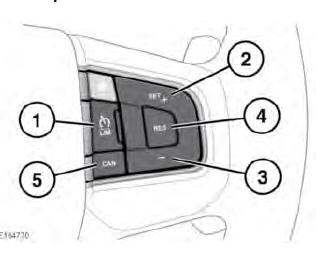
- LIM: Press to switch between Cruise control and ASL. The ASL indicator will illuminate when ASL is active. The Cruise control and ASL systems cannot be used simultaneously.
When the vehicle's ignition is switched on, the previous state, either Cruise control or ASL, will automatically be recalled and made active. The set speed will not be recalled.
Note: ASL operates at all vehicle speeds. A vehicle speed can be set from upwards of 32 km/h (20 mph).
- SET+: Press to set or increase the speed limit. The set speed limit will be displayed in the Message centre.
- Press (-) to decrease the speed limit.
The set speed limit will be displayed in the Message centre.
- RES: Press to resume ASL assistance.
ASL will only resume if the vehicle's speed is less than the set speed and greater than 32 km/h (20 mph). If these criteria are not met, a message will be displayed in the Message centre.
- CAN: Press to temporarily suspend ASL assistance. ASL can also be temporarily suspended by applying sudden, rapid acceleration (kickdown).


READ NEXT:
 Cruise control
In certain conditions, such as a
steep gradient, the vehicle's
speed may exceed the set cruising
speed. This is because engine
braking is unable to maintain or
reduce the vehicle's speed. Driver
inter
Adaptive cruise control
The Adaptive Cruise Control (ACC) system
is designed to maintain a gap from the
vehicle ahead, or a set road speed if there
is no slower vehicle ahead. A speed may
be set at between 32 km/h (20 mph) a
Entering follow mode
When in Follow mode, the vehicle
may not decelerate automatically
to a stop, nor will the vehicle
always decelerate quickly enough
to avoid a collision.
Once a set speed has been selected, the
driver
SEE MORE:
Solvents, Sealants and Adhesives
SOLVENTS
WARNING:
Always handle all solvents, sealers and adhesives with extreme care.
Some contain chemicals or give off fumes which can be dangerous to
health. Always follow the manufacturers instructions. If in doubt about
any substance, particularly a solvent, DO NOT use it.
CAUTION:
If in doub
USB / CD Data Disk Audio
File Compatibility
NOTE:
Before attempting a repair to the in-vehicle
infotainment system
following concerns regarding no playback of audio files stored either
on a USB data storage device or on a CD data disc, check below to
ensure that the audio files in question are encoded in a compatible
format
There are a numbe
