
Land Rover Discovery: Fluid filler locations
Land Rover Discovery (2009–2016) Owner's Manual / Fluid level checks / Fluid filler locations
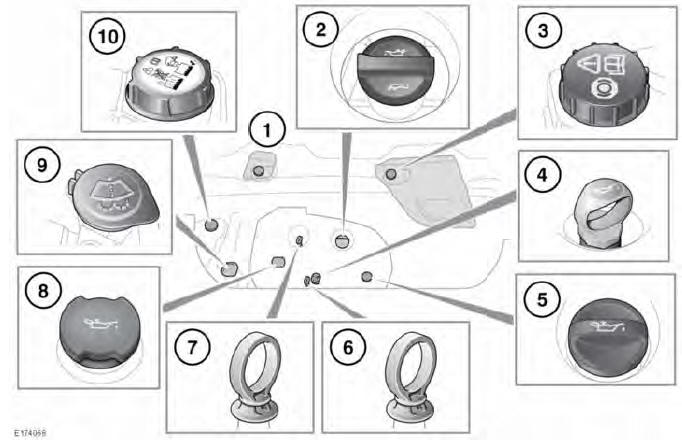
- Brake fluid reservoir cap (right-hand drive). Remove the right-side under bonnet cover for access.
- Engine oil filler cap (2.0L petrol engine).
- Brake fluid reservoir cap (left-hand drive). Remove the left-side under bonnet cover for access.
- Oil level dipstick (2.2L diesel engine).
- Engine oil filler cap (2.2L diesel engine).
- Oil level dipstick (2.0L diesel engine).
- Oil level dipstick (2.0L petrol engine).
- Engine oil filler cap (2.0L diesel engine).
- Washer fluid reservoir filler cap.
- Engine coolant reservoir filler cap.
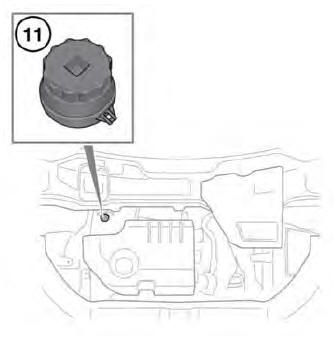
- Diesel Exhaust Fluid (DEF) reservoir filler cap.
- While working in the engine compartment, always observe the safety precautions.
- Do not start the engine, or drive the vehicle, if there is a possibility that any leaked fluid will come into contact with a hot surface, such as the exhaust. Seek qualified assistance immediately.


READ NEXT:
 Checking the engine oil level
Check the engine oil weekly. If any
significant or sudden drop in oil
level is noted, seek qualified
assistance.
Never allow the oil level to fall
below the lower mark or notch on
the dipstick
Topping up the oil
Your vehicle's warranty may be
invalidated if damage is caused by
using oil that does not meet the
required specification.
Failure to use an oil that meets the
required specification could caus
Topping up the coolant
Never remove the coolant
reservoir filler cap when the
engine is hot. Escaping steam or
scalding water could cause serious
personal injury.
Unscrew the filler cap slowly,
allowing the pressure
SEE MORE:
Joints and Joint Faces
All gaskets should be installed dry unless stated otherwise. Always apply the
specified lubricant to O-rings and install O-rings using the fingers only.
Use gasket removal spray and/or plastic scrapers to remove traces of old
gasket.
CAUTION:
DO NOT use metal scrapers or emery cloth as these may da
Progress control system
PROGRESS CONTROL SYSTEM
OVERVIEW
The Progress control system can help the
driver to manoeuvre on slippery surfaces.
The system operates in either a forward
or a reverse direction at low speeds, for
example, pulling away from standstill,
ascending or descending an incline, and
driving on unstable/sl
© 2019-2026 Copyright www.lrdisc.com
