
Land Rover Discovery: Disabling the passenger airbag
(Not Australia)
Note: Disabling the passenger airbag is market dependent.
The passenger's front airbag can be switched on and off, using the interactive controls in the Instrument panel when the vehicle is stationary
- The passenger airbag should be disabled when a child restraint is fitted to the front passenger seat.
- Crash test data and statistics show that the safest place for a child to be restrained is in a child seat correctly fitted to the vehicle's rear seat.
- Do not use a child restraint on a seat protected by an operational airbag in front of it. Doing so presents a high risk of death or serious injury to the child in the event of an accident.
Select Passenger Airbag from the Vehicle Set-Up menu, located in the Main Menu.
The displayed text and diagram will show the current Passenger Airbag On or Off status. Select Change Setting to choose either On or Off.
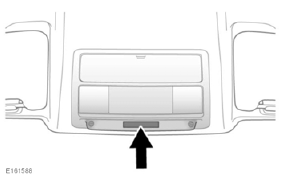
An airbag status indicator lamp, mounted
in the overhead control panel (as
illustrated), will display the operational
status of the passenger airbag, as shown
in the following table: 
* Displays for 60 seconds, then extinguishes.
Note: The Instrument panel will also display a warning for 4 seconds every time the ignition is switched on.
- When checking the operational status of the front passenger airbag, make sure the ignition is switched on and the warning lamp bulb check period of 8 seconds has elapsed.
- As soon as the child seat is removed from the front passenger seat, the airbag must be switched on. Failure to do so will put any front seat passengers at greater risk of death or serious injury in the event of an accident.
- Do not fit a child restraint to the front passenger seat if the airbag warning lamp illuminates continuously with the ignition on.
- The passenger airbag must be disabled when a rearward-facing child restraint is fitted to the front passenger seat.


READ NEXT:
 Airbag service information
Phone systems should only be
installed by qualified persons
familiar with the operation of, and
requirements for, vehicles fitted
with a Supplementary Restraint
System (SRS). If you are in any
Instrument panel
Speedometer.
Tachometer.
Message centre and menu display.
Fuel gauge
As a reminder for the location of the
fuel filler, there is an arrow next to the
fuel pump symbol pointing to the
relevant
Instrument panel menu
A number of vehicle features and display
settings may be configured via the
Instrument panel menu.
To display and navigate through the
Instrument panel menu, operate the menu
control on the steerin
SEE MORE:
Hood Latch
Right striker
Right hood latch
Hood safety latch
Hood safety latch guide
Left striker
Left hood latch
Hood switch
Hood release lever
The hood is secured in the closed position by two latches located on each
side of the hood latch panel. The hood release lever is located below the
instrum
Using wheel chocks
Note: Not all vehicles have wheel chocks
supplied as part of the tool kit.
Wheel chocks are a useful addition to a
vehicle's tool kit. Note the following
advice when using wheel chocks:
Before raising the vehicle, the
wheel diagonally opposite the
one to be removed must be
chocked.
Always choc
