
Land Rover Discovery: Manual seats / Electric seats
Manual seats
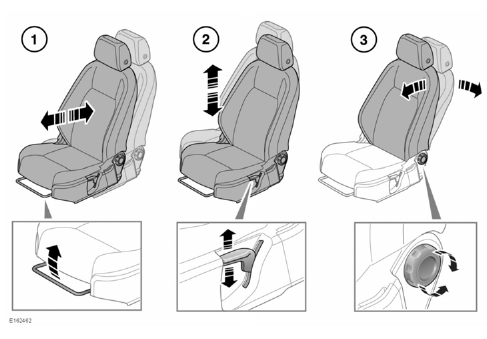
- Forward and rearward adjustment.
- Height adjustment.
- Seatback angle adjustment.
For information on how to adjust the front head restraint
Do not adjust the seat while the vehicle is moving; doing so could cause a loss of vehicle control and personal injury.
Electric seats
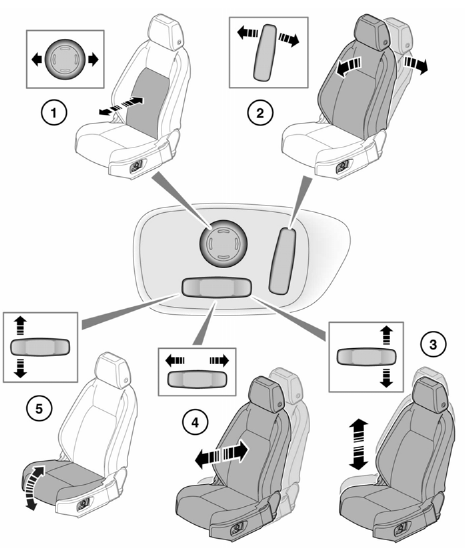
- Lumbar support adjustment.
- Seatback angle adjustment.
- Height adjustment.
- Forward and rearward adjustment.
- Cushion angle adjustment.
To adjust the seats, the Smart key must be inside the vehicle.
For information on how to adjust the front head restraints
Do not adjust the seat while the vehicle is moving; doing so could cause a loss of vehicle control and personal injury.
Restricted front seat travel
If seat movement stops unexpectedly during adjustment, check for and remove any obstructions.
Once any obstructions have been removed, the seat adjustment mechanism can be reset as follows: Operate the button again to continue the stalled adjustment. When seat movement resumes, hold the button until the end of travel in that direction has been reached.
Seat adjustment can now be carried out as normal.
Note: If no obstructions can be seen, but normal adjustment cannot be carried out without stalling, contact your Retailer/ Authorised Repairer.


READ NEXT:
 Sitting in the correct position
The driver and front seat
passenger must not ride with the
seat fully reclined.
Do not adjust the seat while the
vehicle is moving.
The seat, head restraint, seat belt and
airbags, all contribute to
Folding the rear seats
Always make sure that objects
carried in the vehicle are secured
properly.
Never allow passengers to travel
in the loadspace under any
circumstances.
Make sure that when the seatback
is raised, the lo
SEE MORE:
General Service Information
INTRODUCTION
This manual has been written in a format that is designed to meet the needs
of Land Rover technicians worldwide and to assist them in the efficient
repair and maintenance of Land Rover vehicles.
This manual provides descriptions and methods for accomplishing
adjustment, service and rep
Glass Roof Panel
Blind (G1805063) / Removal and
Installation
Glass roof panel blind (G1805063)
- Removal
Refer to: A-Pillar Trim Panel (501-05, Removal and
Installation).
Refer to: B-Pillar Upper Trim Panel (501-05, Removal and
Installation).
Refer to: C-Pillar Upper Trim Panel (501-05, Removal and
Installation).
Refer to: D-Pillar Trim Panel (501-05, Remova
