
Land Rover Discovery: Information and Entertainment System / General information
Land Rover Discovery (2009–2016) Service Manual / Electrical / Information and Entertainment System / Information and Entertainment System / General
information
Map Update Applicability - Digital Versatile Disc (DVD) / Universal Serial Bus (USB) Flash Drive / Secure Digital (SD) Memory Card
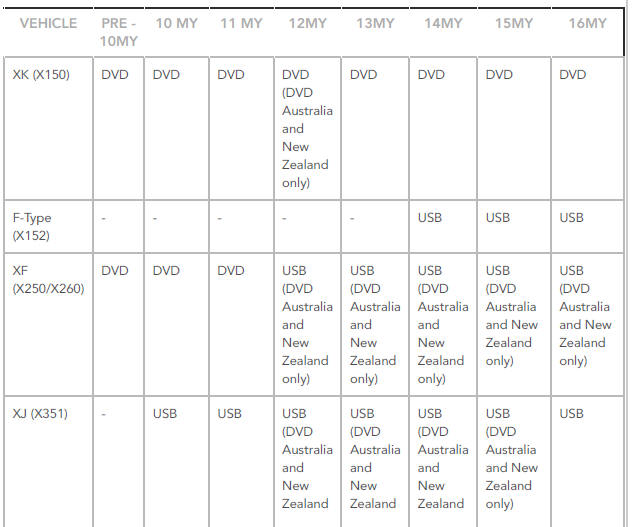
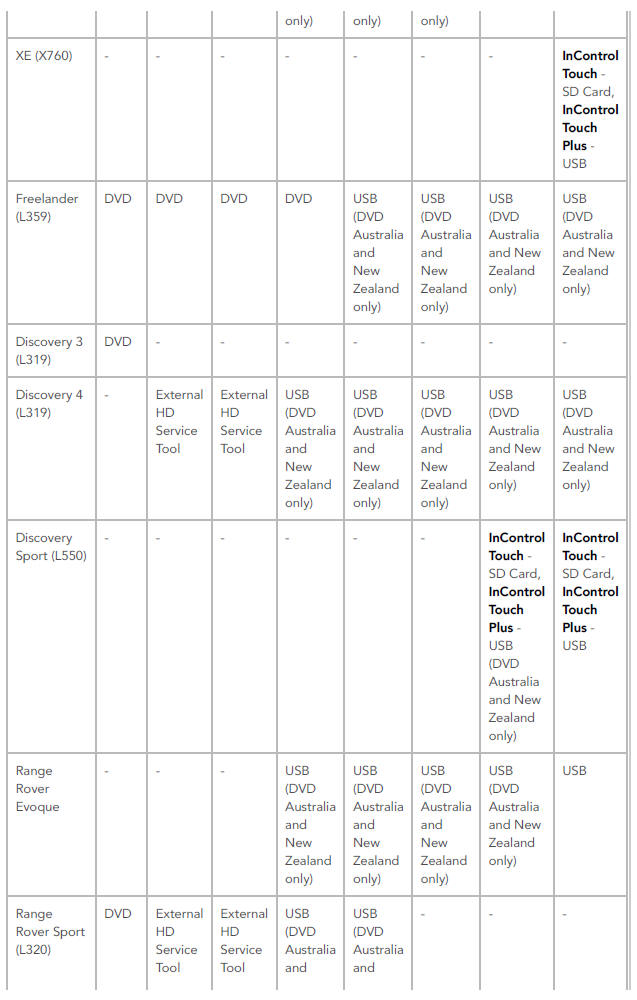
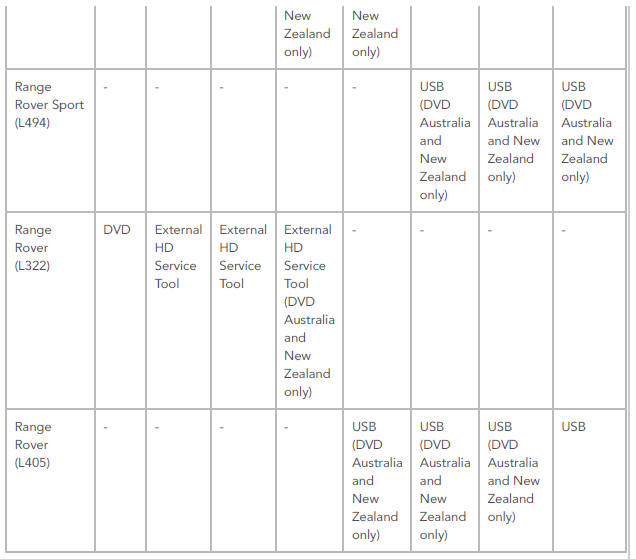
NOTE:
For vehicles using a Navigation Control Module (NCM), refer to SD Card Navigation Updates (Asia Navigation) below.
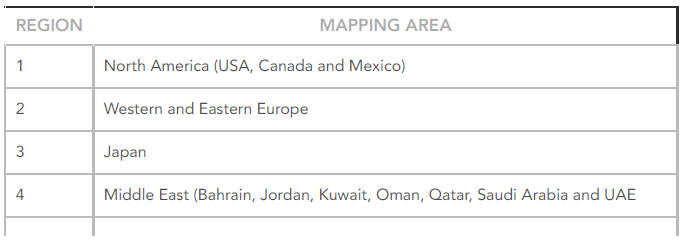
Mapping Regions

- DVD Map updates
- USB Map updates
- Information and Entertainment Display (G1785534) / Removal and Installation


READ NEXT:
 DVD Map updates
Vehicles equipped with the 'remote' Navigation Control Module (NCM) are
supplied with either a DVD or SD memory card map update which is loaded
into and left in the NCM. Map data is read directly fr
USB Map updates
All Gen 2.1 equipped vehicles are supplied with a USB map updates, these
updates can be performed by the customer.
The following process should be used to update the map data:
Start the engine.
N
Information and Entertainment Display (G1785534) / Removal and
Installation
REMOVAL
CAUTION:
Use a suitable trim tool.
NOTE:
Removal steps in this procedure may contain installation details.
Disconnect the battery ground cable.
Refer to: Specifications (414-01 Battery, Mount
SEE MORE:
Voice Control
COMPONENT LOCATION - INCONTROL TOUCH AUDIO SYSTEMS
Touch Screen (TS)
Left steering wheel switchpack
Instrument Cluster (IC)
Microphone
Portable audio interface panel
Audio Head Unit (AHU)
COMPONENT LOCATION - INCONTROL TOUCH PLUS AUDIO SYSTEMS
Touch Screen (TS)
Left steering wheel swi
Auxiliary Battery (G1913471) /
Removal and
Installation
REMOVAL
NOTE:
Removal steps in this procedure may contain installation details.
Disconnect the battery earth lead.
Refer to: Specifications (414-01 Battery, Mounting and Cables,
Specifications).
Refer to: Plenum Chamber (412-01 Climate Control, Removal and
Installation).
Torque: 10 Nm
Torque: 1
© 2019-2026 Copyright www.lrdisc.com
